Bring your own IPTV
VEIL IPTV
Your IPTV subscription, reimagined as a real TV guide. Preview in the corner, swipe to change channels, pause live TV and watch four at once, on iPhone, iPad and iPhone Duo.
Veil IPTV doesn’t include any channels. You need your own subscription from a provider.
The Guide
A real TV guide, not a channel list.
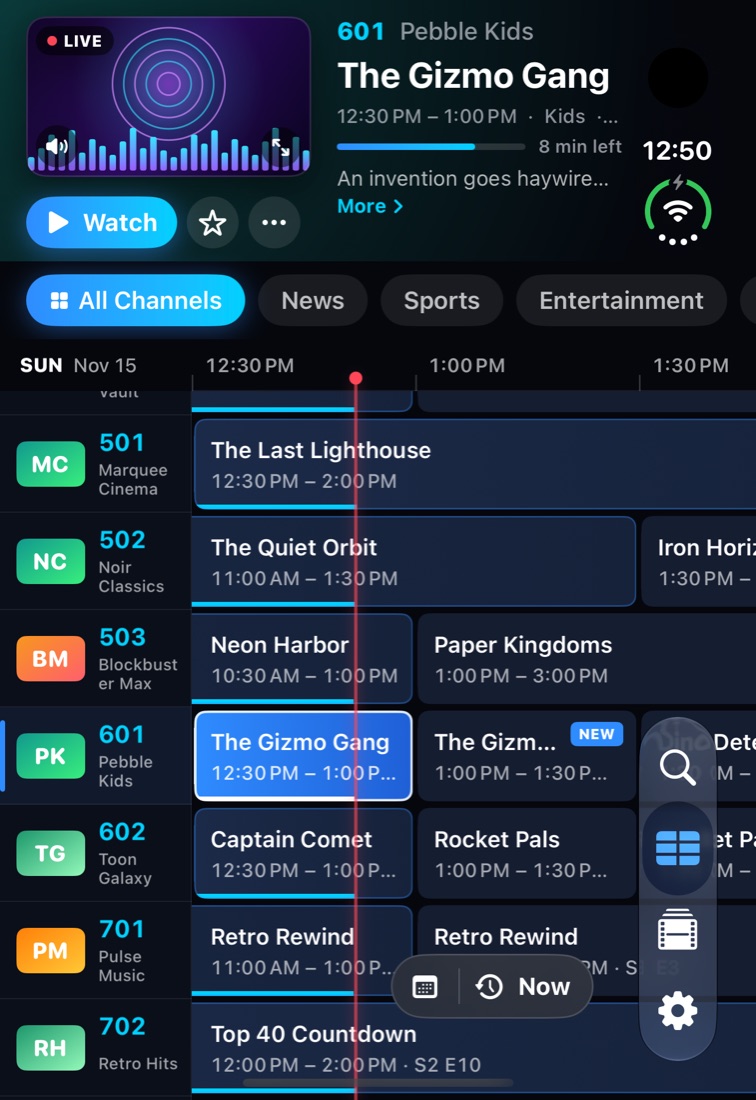
Add your provider’s M3U playlist or Xtream login and an XMLTV guide. Veil IPTV lays it all out like a set-top box: channels down the side, time across the top, and a red line for now.
- Live preview in the corner while you browse.
- Groups and genres one tap away, with now and next on every row.
- Handles huge lineups: more than 10,000 channels stay smooth.
- Smart guide matching fills in listings for channels with odd names.
Watching
Tap to watch. Swipe to surf.
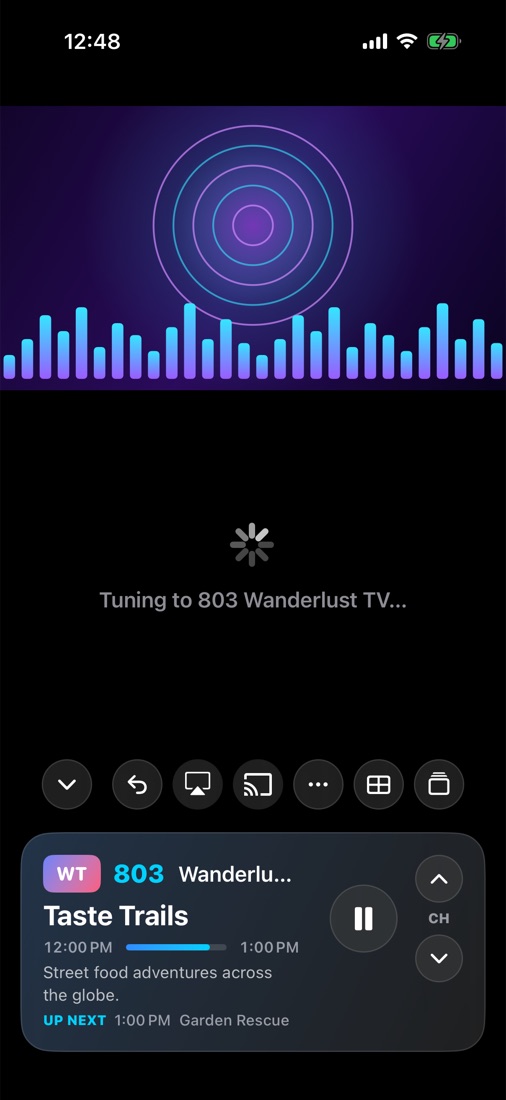
Tap a show again to go full screen. Swipe up or down to flip channels like a remote, and the programme card tells you what’s on and what’s next.
- Pause and rewind live TV with the scrub bar built into the progress line.
- Replays and Start Over on channels with catch-up.
- Closed captions from the broadcast, when the feed has them.
- AirPlay, Chromecast and Picture in Picture.
Made for iPhone Duo
Browse closed. Open for the big picture.
Scroll the guide and pick a channel on the outer screen. Open your iPhone Duo and the same channel stays selected while the guide spreads across the inner screen, with more hours, every group and full titles.
Multi-View
Four channels. One screen.
Keep the game, the news and two more on at once. Tap a tile for its sound, hold it to swap the channel.
iPad
Room for the whole evening.
On iPad the guide shows every group and hours of listings at a glance, with the preview and programme details up top.
Everything else
Built for people who actually watch TV.
M3U, Xtream & XMLTV
Paste a playlist link or an Xtream login. Guides are picked up automatically when the playlist names one.
Replay & reminders
Catch up on shows you missed, start over from the beginning, and get a nudge before something starts.
Favorites & groups
Star channels, build your own groups, rename and reorder them, and hide what you never watch.
Parental controls
Lock channels and groups behind a PIN or Face ID.
iCloud sync
Your sources, favorites and settings follow you between devices. Logins travel through iCloud Keychain.
Themes
Midnight, Ember and more. Pick the color that suits your living room.
Veil IPTV Pro
Try it free. Then pick your plan.
Start with a 3-day free trial of Veil IPTV Pro: Multi-View, pause and rewind live TV, replays, Picture in Picture, Chromecast, the full guide, reminders, iCloud sync and themes. Then keep it yearly, or pay once for life.
Trial
- Pro features unlocked for 3 days
- Starts with Pro Yearly
- Cancel before it ends and pay nothing
- Then $9.99 a year
Pro Yearly
- Everything in Pro
- Cancel anytime in your App Store settings
- One purchase covers your iPhone and iPad
Pro Lifetime
- Everything in Pro, forever
- Restore it on all your devices
- No subscription
Prices in US dollars; the App Store shows your local price. Purchases are handled by Apple.
FAQ
Questions
Does Veil IPTV come with channels?
No. Veil IPTV is a player. It doesn’t sell, include or recommend any channels or providers. You add the playlist, Xtream login or guide that your own provider gives you.
What do I need to get started?
An M3U/M3U8 playlist link or an Xtream Codes login from your provider, and optionally an XMLTV guide link. Want to look around first? Tap Explore the Demo Lineup on the welcome screen.
Is there a free version?
There’s a 3-day free trial with everything included except extra sources. After that, Veil IPTV needs the yearly plan ($9.99) or the one-time Lifetime unlock ($29.99). Cancel the trial in your App Store settings before it ends and you pay nothing.
Where are my logins stored?
On your device, in the iOS Keychain. They go straight from your device to your provider and never to us. If you turn on iCloud sync, they travel through iCloud Keychain, which is end-to-end encrypted.
Which devices does it run on?
iPhone and iPad running a recent version of iOS, including both screens of iPhone Duo. A Mac version and an Apple TV app are on the way.
A channel won’t play. What can I try?
See Troubleshooting in the guide: switching the stream format, setting a User-Agent and the connection limit fix most provider quirks.